


My Mitsubishi Connect
4.71.48K Reviews
App Specs
- Version
- v2.90.10
- Updated On
- License
- Free
- Downloads
- 100,000+
- Developer
- Mitsubishi Motors Corporation
- Categories
- Auto & Vehicles
- Platform
- Android, iOS
Screenshots
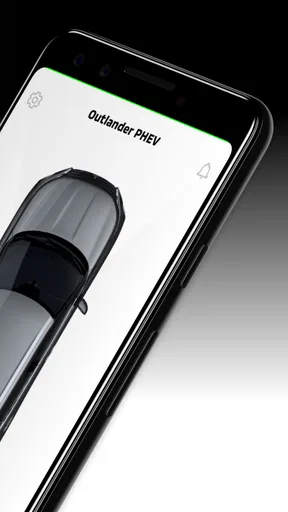
 Analysis by AppCompare
I’m most persuaded by My Mitsubishi Connect when I think of it as a daily companion to a compatible Mitsubishi, not as a substitute for the car’s controls or a reason to buy a particular vehicle. Its appeal is easy to understand during the first few days: try a remote function, glance at vehicle information, and see what connected services feel like from a phone. The more important question is whether those conveniences stay useful after the novelty wears off. For me, the answer depends on whether the app fits naturally into your regular routine.
What feels useful in the first week
The first wins are practical rather than dramatic. If your Mitsubishi supports the relevant connected services, being able to check or control certain vehicle functions from a phone can save a walk outside or a second trip back to the car. I can see the appeal on a cold morning, when a remote-start option and climate controls are available for the vehicle: prepare the car before leaving home, then head out without making the setup itself a project.
That convenience has a boundary worth keeping in mind. Connected functions depend on the vehicle and its support for the service, so I would check compatibility for the specific Mitsubishi before planning a routine around a feature. The app is free, but the important question is not simply whether it installs; it is whether the vehicle you own can use the functions you actually care about.
How the value changes month to month
Remote controls may be the feature that gets someone to open the app, but vehicle information and reminders have a better chance of earning a lasting place on the phone. A fuel or mileage check can be handy before an errand, while a maintenance alert can prompt you to arrange service before a small task slips your mind. Those uses are modest, yet recurring convenience is often more valuable than a feature you try once and forget.
A realistic routine might be checking the vehicle before leaving a busy workplace, then using a reminder to keep service planning from disappearing beneath other calendar tasks. For a household with more than one driver, location or boundary alerts may also help with a particular safety concern, such as knowing when a car has left an agreed area. I would treat that as an extra source of awareness, not as a replacement for a direct conversation about who is driving and where they are going.
The app’s value is therefore personal. Drivers who regularly use supported remote functions or appreciate a single place for vehicle status may keep returning. If you mainly need directions, music, or ordinary phone-to-car connectivity, your vehicle’s built-in system or a general navigation app may already cover the tasks you do most often.
The Ultimate Co-Pilot
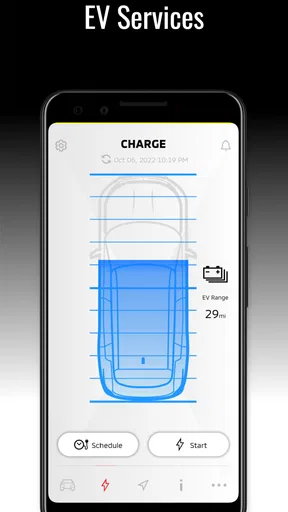
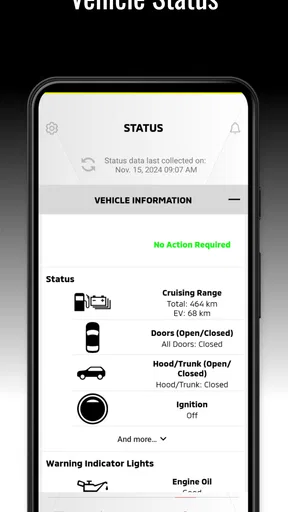
My Mitsubishi Connect is designed to integrate seamlessly with your vehicle, providing a suite of features that make driving not just easier, but also smarter. The app syncs with your Mitsubishi vehicle to offer remote services, real-time information, and a treasure trove of analytics about your car’s performance.
Worth Reading Before You Choose

EA SPORTS FC Mobile 26 Is a Bigger Football Game, but It Takes Time

Flipboard Shows What News Apps Must Do Beyond the Feed

Switching to Android Auto Means Rethinking Your Driving Routine

Google Calendar Makes a Crowded Week Easier to Manage

Ludo King Makes the Most of the Minutes Between Plans

Baby Panda World Brings Quick Play to Modern Phones, but Its Game Library Feels Busy
Remote Services at Your Fingertips
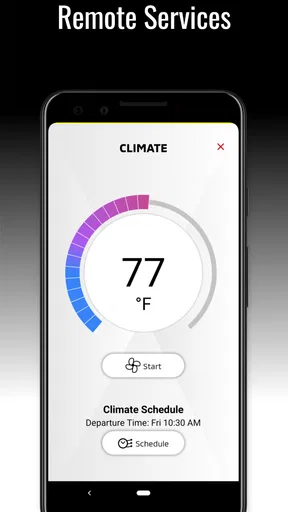
Imagine it’s a frosty morning, and you want to warm up your car without stepping out into the cold. With this app, you can start your car remotely, adjust the climate control, and even lock or unlock your doors. It’s like magic, but it’s real life. I tried it myself, and let me tell you, there’s something incredibly satisfying about remote-starting your car while sipping coffee from the comfort of your kitchen.
For a useful habit, I would keep remote actions tied to a clear moment: check the car before leaving, prepare it if the vehicle supports it, and confirm the doors are secure rather than relying on memory. That turns a novelty into a small routine. It also avoids treating a phone command as proof that every part of the car is ready for a journey; a quick visual check still makes sense when conditions call for one.
Keeping You Connected and Informed
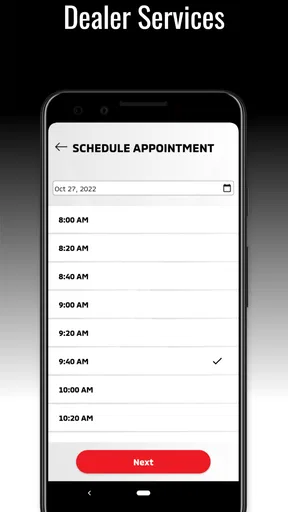
The app doesn’t just stop at remote controls. It also provides real-time vehicle information, like your car’s health status, fuel level, and mileage. You can receive maintenance alerts and even set reminders for service appointments. This means you’ll never have to guess when it’s time for an oil change or worry about surprise maintenance issues. It’s like having a mechanic in your pocket!
I’d use those details as prompts for better planning, not as a reason to postpone the owner’s manual or a proper inspection. A reminder can help you book a visit; it cannot assess every sound, warning light, or change in how the car feels. Likewise, a fuel-level glance is useful before setting out, but the dashboard remains the more immediate reference once you are behind the wheel.
Navigation and Safety Features
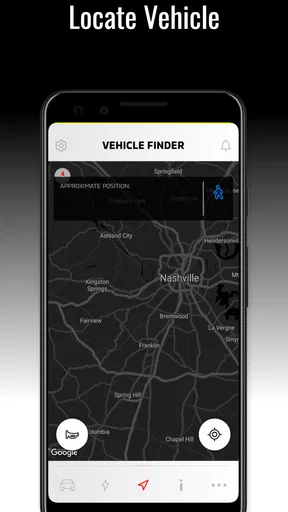
My Mitsubishi Connect also shines in the navigation department. The app allows you to send destinations from your phone directly to your car’s navigation system. Plus, with built-in safety features, you can track your vehicle’s location and get alerts if it leaves a designated area. It’s peace of mind for parents who want to keep tabs on their teen drivers.
Sending a destination ahead of time is most helpful when you plan a trip while parked, then want to avoid re-entering the address in the car. I would make that part of the before-you-leave checklist, rather than trying to manage a phone while driving. Location alerts work best when everyone who shares the car understands why they are being used; in a family, clear expectations matter as much as the alert itself.
Data-Driven Insights
For those of us who love data, this app provides detailed analytics on your driving patterns, fuel efficiency, and more. It’s like having a personal data analyst dedicated to improving your driving experience. I found it fascinating to see how my driving habits impacted my fuel consumption and started making adjustments. Who knew an app could teach me to be a better driver?
Driving summaries can be more useful as a comparison with your own habits than as a score to chase. If fuel use changes, I’d look at the route, traffic, weather, and load before deciding that driving style is the only explanation. That makes the information a starting point for reflection rather than a verdict on how well you drive.
What to check before making it part of your routine
The app is from Mitsubishi Motors Corporation and sits in the auto-and-vehicle category, but it is not a universal remote for every car with a Mitsubishi badge. I would first confirm that the particular vehicle supports the services you want, then register and see which options are available for that vehicle. This is the most useful step before investing time in setup, because a feature-rich screen is only valuable if it matches your car.
It is available at no cost and is rated for everyone. Its current version is v2.87.10, and Android support starts at version 6.0. Those details make installation straightforward for many phone owners, but they do not remove the vehicle-compatibility check. If the app is not showing a feature you expected, I would first check the vehicle and connected-service setup rather than assume the phone itself is the problem.
There is also a practical distinction between using a manufacturer’s connected app and relying on the usual alternatives. A general navigation app is often the simpler choice if all you want is directions across different vehicles. The Mitsubishi app’s reason to stay installed is its connection to supported vehicle functions and information, not that it should replace every driving app on your phone. I’d use each for the job it handles best.
The User Experience
One thing I really appreciate about My Mitsubishi Connect is its user-friendly interface. The app is intuitive, with a clean design that makes navigation a breeze. Even if you’re not tech-savvy, you’ll find it easy to set up and use. I had it up and running in minutes, and everything was pretty much self-explanatory.
Compatibility and Accessibility
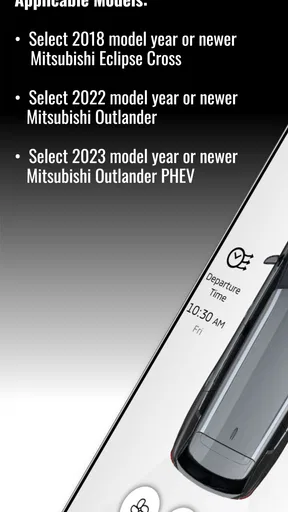
It’s worth mentioning that the app is compatible with a range of Mitsubishi models, but you’ll want to check if your specific vehicle can support it. Also, the app is available for both Android and iOS, so no one’s left out. Downloading and installing was smooth, and I didn’t encounter any glitches or bugs during my testing.
In terms of accessibility, the app’s voice command feature is a game-changer. Whether you’re driving or just have your hands full, you can control various features using simple voice commands. It’s a handy feature that definitely adds to the overall appeal.
Keeping the app useful without adding chores
For maintenance, I’d keep the setup simple: register the vehicle, identify the few functions you expect to use, and check the app when there is a real reason rather than opening it out of habit. That keeps connected services from becoming another stream of notifications to manage. If reminders are useful, make them part of the same routine you already use to plan vehicle service; if they are not, there is little benefit in checking the app just to see whether anything has changed.
One trade-off is that a connected app asks you to maintain a relationship between the phone, account, and vehicle. That is worthwhile if the remote functions, information, or alerts solve recurring problems for you. It is less compelling if you drive infrequently, prefer to handle everything from the dashboard, or do not want another account-based service in your day. I would not keep it installed just because it has many options; I’d keep it if at least one or two of those options save effort often enough to matter.
There is a small habit question, too: will you remember to use the app at the moment it helps? If you only think of remote preparation after you have already reached the car, the feature will feel less useful. Pairing it with an existing cue, such as checking your bag before leaving home, makes the benefit more dependable without turning the app into a daily obligation.
Who is likely to keep using it
I think the strongest fit is a Mitsubishi owner whose vehicle supports the services they want and who has a recurring reason to check or manage the car remotely. Parents who have agreed on sensible boundaries with a newer driver may appreciate location alerts, while someone with a busy service schedule may value mileage and maintenance prompts. Drivers who want a quick way to prepare or check their vehicle can also find a place for it.
I would skip it if your Mitsubishi does not support the functions you expect, or if your needs stop at turn-by-turn directions and basic phone connectivity. In those cases, the car’s own controls and a familiar navigation app may be less work. I’d also be cautious about treating location features as a substitute for trust or communication; they are tools for a defined need, not a complete safety plan.
The app has a 4.7 average from around 17,000 ratings, with roughly 1,500 written reviews and over 100,000 installs. I see that as a sign that many owners have found a reason to try it, not a promise that every model, setup, or routine will feel equally convenient. The only convincing test for me is whether the functions available for your own vehicle become useful enough to remember after the first week.
Final Thoughts
All in all, My Mitsubishi Connect is a fantastic companion for any Mitsubishi owner. It’s packed with features that make driving more convenient, safe, and fun. Whether you’re a tech enthusiast or just someone looking to add a little more ease to your daily routine, this app is definitely worth checking out. Plus, the ability to stay connected with your vehicle no matter where you are is a game-changer.
So, if you’re ready to transform your driving experience, head over to the app store and give it a try. It’s like having the future of driving, right in your palm!
The lasting test is less about how impressive the first remote command feels and more about whether you reach for the app a month later. If it helps you prepare the car, keep service plans visible, or handle a specific family need, it can earn its space without demanding much attention. If those situations rarely apply, uninstalling it or leaving it unused is a reasonable choice; a connected feature is only a benefit when it fits the way you actually drive.
Pros
- User-friendly interface with intuitive navigation.
- Real-time vehicle status updates.
- Remote start and climate control feature.
- Comprehensive trip history tracking.
- Customizable alerts for maintenance.
Cons
- Limited compatibility with older models.
- Requires stable internet connection.
- Subscription fees for premium features.
- Occasional connectivity issues reported.
- Limited features in some regions.
FAQs for My Mitsubishi Connect
What is My Mitsubishi Connect and what does it offer?
My Mitsubishi Connect is a robust app designed to enhance your driving experience by offering a suite of connected services. These include remote vehicle operations, real-time vehicle location tracking, and emergency assistance features. It allows users to stay connected with their Mitsubishi vehicles, providing convenience and safety at their fingertips.
Is My Mitsubishi Connect compatible with all Mitsubishi vehicles?
My Mitsubishi Connect is compatible with select Mitsubishi models, primarily those from recent years equipped with the necessary hardware. Before downloading the app, it's crucial to verify whether your specific model supports the My Mitsubishi Connect services by checking the vehicle's manual or contacting Mitsubishi customer support.
What features are available through the remote operations in My Mitsubishi Connect?
The remote operations feature in My Mitsubishi Connect allows you to control certain aspects of your vehicle from your smartphone. This includes remote start and stop, door lock and unlock, and climate control adjustments. These features provide added convenience, especially in extreme weather conditions or when you have your hands full.
How secure is My Mitsubishi Connect in terms of data privacy?
Data security is a priority for My Mitsubishi Connect. The app uses advanced encryption protocols to protect your personal information and vehicle data. Mitsubishi has implemented strict privacy policies to ensure that data is only used for providing the services and is not shared without your consent, aligning with industry standards for data protection.
Are there any costs associated with using My Mitsubishi Connect?
While downloading the My Mitsubishi Connect app is free, some features may require a subscription service. These subscriptions can vary based on the level of service you choose. It's important to check the app for any associated costs or promotional offers that may apply to new users.


